How to Cancel a Reviewer
An editorial user may need to cancel a reviewer if the reviewer is taking too long to complete the review or if the reviewer assignment needs to be withdrawn for any other reason.
To cancel the reviewer:
-
Go to the Reviews section and locate the reviewer you want to cancel.
-
Under Action(s), click the three-dot menu (⋯).
-
Select Cancel Reviewer.
-
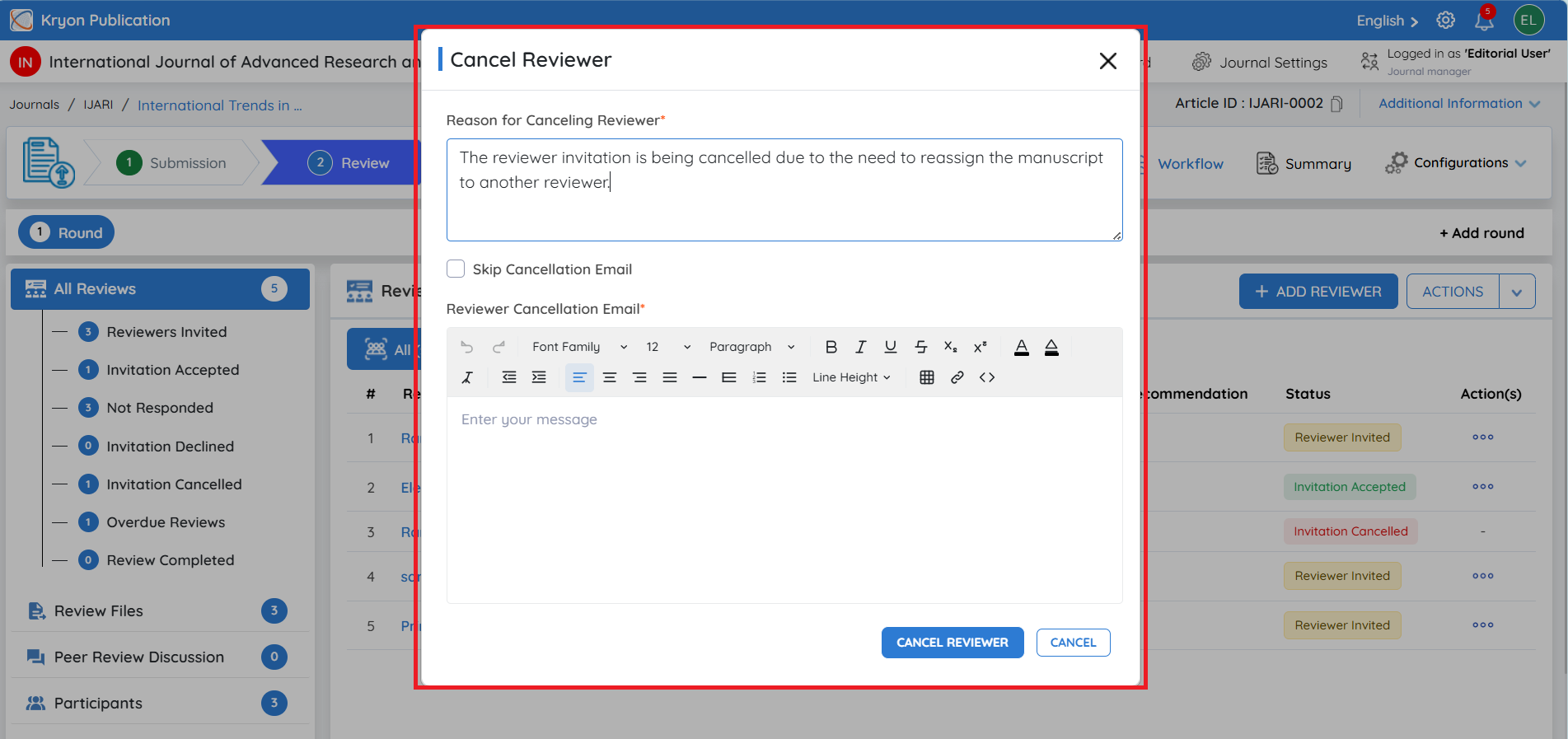
The Cancel Reviewer window will open.
-
In Reason for Canceling Reviewer, enter the reason for cancelling the reviewer assignment.
-
In Reviewer Cancellation Email, enter or edit the message that will be sent to the reviewer.
-
If you do not want to send a cancellation email to the reviewer, select Skip Cancellation Email.
-
Verify the details and click Cancel Reviewer.
Once cancelled, the reviewer will no longer be expected to complete the review, and the reviewer status will be updated accordingly.
By default, the reviewer will receive an email informing them that their review assignment has been cancelled. Select Skip Cancellation Email only when you do not want the system to send this notification.