Editing an Existing Reviewer Queue
Once reviewers have been assigned, the editorial user can still modify the existing reviewer queue when additional reviewers need to be invited.
To edit the queue:
-
From the All Reviews section, click + Add Reviewer.
-
Select Edit Existing Queue.
-
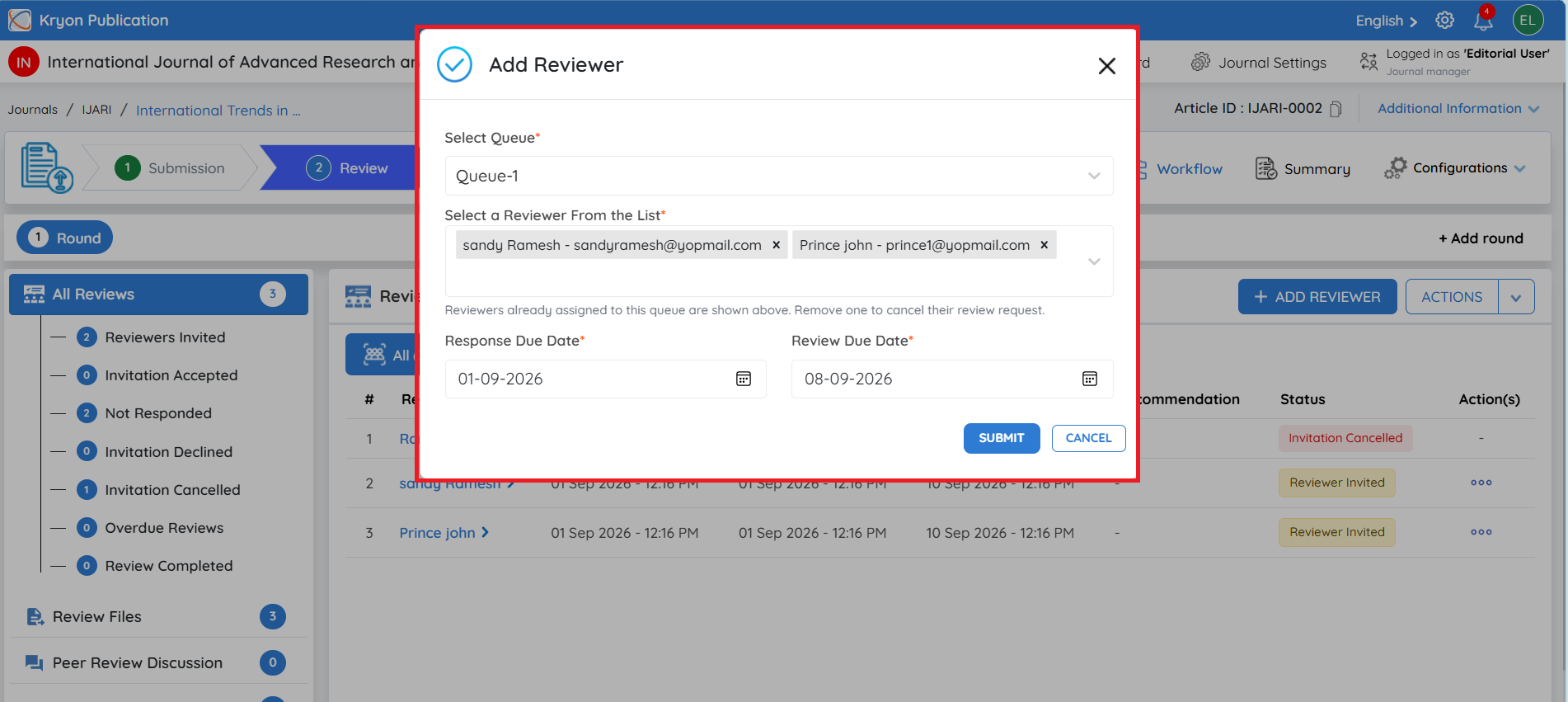
The Add Reviewer window will open.
-
Under Select Queue, choose the queue that needs to be updated, such as Queue-1.
-
Under Select a Reviewer From the List, select the additional reviewer to be added. The reviewer list displays useful information such as expertise/keywords, invited, pending, completed, declined, and rating to support the selection.
-
Set the Response Due Date – the deadline for the reviewer to respond to the review invitation.
-
Set the Review Due Date – the deadline for completing and submitting the review.
-
Click Submit.
The selected reviewer will be added to the existing queue, rather than creating a separate reviewer queue.
Adding another reviewer to an existing queue does not change the purpose of the queue. The configured Reviewer Limit continues to control the required number of accepted reviewer invitations.