Billing Management
Overview
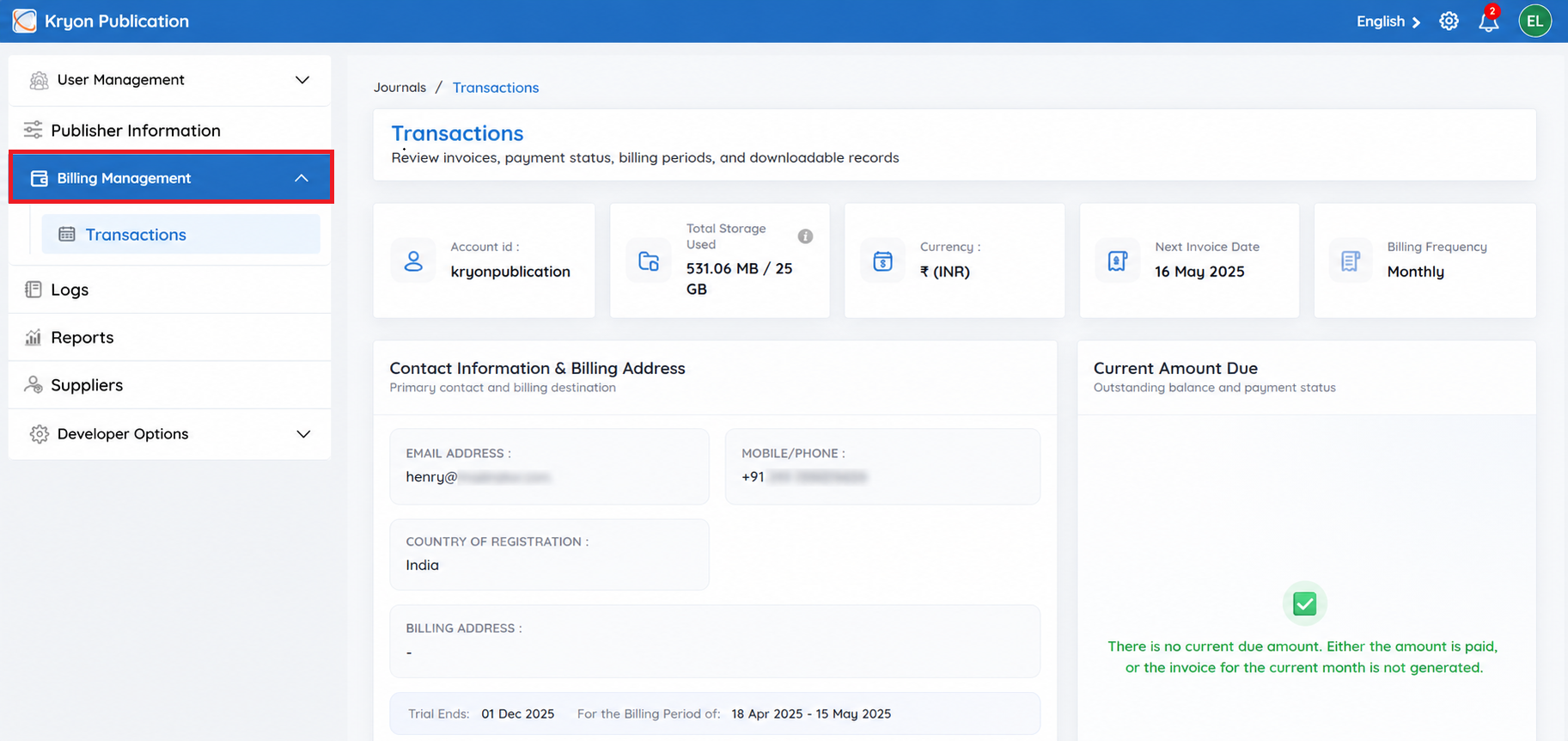
The Billing Management section provides a centralized view of your organization's billing information, account details, and resource usage. It enables administrators to monitor billing status, review account information, and stay informed about invoices and usage within Kryoni JMS.
Account Information
View your organization's billing profile, including:
- Account ID – Unique identifier for your publishing organization.
- Contact Email – Primary email address for billing communications.
- Contact Phone – Registered contact number.
- Billing Address – Address used for invoicing and payment records.
- Country/Region – Registered billing location.
- Currency – Currency used for billing and invoices.
Keeping this information up to date ensures that billing notifications and invoices are sent to the correct contact details.
Current Billing Status
The Current Billing Status displays the amount currently due for your account.
- If an amount is displayed, payment is pending.
- If no amount is due, it indicates that the previous invoice has been paid or the current billing cycle has not yet generated an invoice.
This section helps you quickly monitor your account's payment status.
The Storage Usage section displays the total storage consumed by your organization within Kryoni JMS.
Example: Storage Used: 21.08 KB
Monitoring storage usage helps you understand your organization's resource utilization and supports effective account management.